
PDF Split and Merge
Andrea Vacondio
Screenshots
App details
- Updated
- Oct 16, 2019
- Language
- Spanish 10 moreLanguagesSpanishEnglishPo...
- Developer
- Andrea Vacondio
- Category
- Mobile
SoftPas in:
This product is also available in the following languages:
About PDF Split and Merge
Download PDF Split and Merge – PDF tool, PDF utility, PDF merger, PDF splitter, PDF editor
Overview
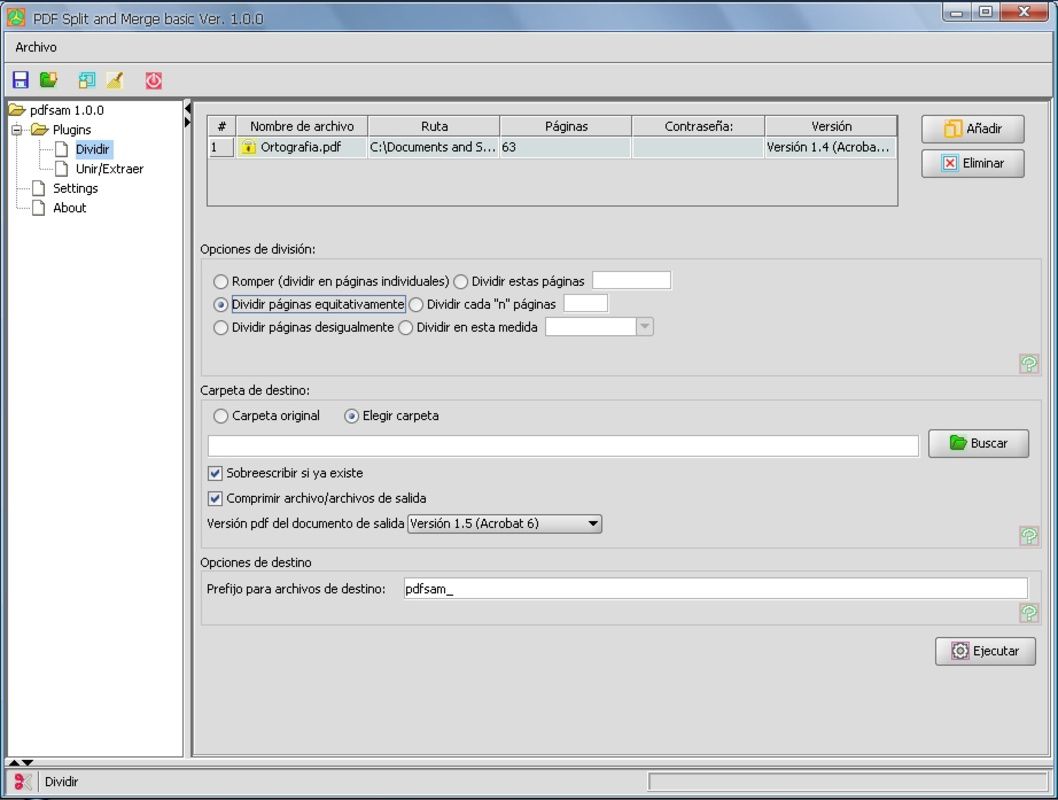
The PDF Split and Merge application is a dedicated utility designed for users who frequently handle PDF documents across various professional and personal contexts. As a free mobile tool, it offers essential functions for managing, organizing, and optimizing PDF files directly from smartphones and tablets. The app enables users to split large PDFs into smaller, more manageable sections, merge multiple documents into a single file, extract specific pages, and reorder pages within a document. These capabilities make it particularly useful for students, professionals, and administrative staff who need to process reports, contracts, presentations, or academic materials efficiently.
By allowing users to define page ranges, create custom splits, and automate repetitive workflows, the app supports a high degree of customization in document handling. The ability to group tasks and transfer configurations across devices enhances its utility in multi-device environments. While the developer did not provide additional technical details about the app’s architecture or underlying processing engine, its core functionality is clearly focused on improving productivity through intuitive PDF manipulation. In the broader mobile app ecosystem, PDF Split and Merge fills a niche for lightweight, accessible tools that deliver reliable performance without requiring complex setup or subscription fees.
Key Features & Functionality
- File Splitting: Users can divide large PDFs into smaller documents by selecting specific page ranges or individual pages. This is ideal for isolating chapters, sections, or key pages for sharing or archiving.
- Merging PDFs: Combine multiple PDF files into one cohesive document. This feature is especially valuable when compiling reports, portfolios, or multi-part forms into a single file for distribution.
- Page Order Management: Reorder pages within a document to match desired layouts. This functionality supports editing workflows where sequence matters, such as in legal documents or presentation decks.
- Task Automation: Save frequently used operations as task groups and apply them across different files. This reduces manual effort and ensures consistency in repetitive tasks.
- Cross-Platform Support: Export and import task configurations between devices, enabling seamless workflow continuity across Android and iOS systems.
For example, a university student might use the app to extract lecture notes from a 50-page PDF and merge them with another document for a study guide. A real estate agent could combine property listings, contracts, and disclosures into a single client-ready file. The automation feature allows professionals to standardize document preparation, minimizing errors and saving time over repeated operations.
Interface, UX & Performance
The user interface of PDF Split and Merge is designed with clarity and functionality in mind. The layout emphasizes direct access to core operations—split, merge, reorder, and task management—ensuring that users can navigate the app with minimal learning curve. Visual cues such as page thumbnails and drag-and-drop indicators enhance usability, particularly during page reordering tasks.
Navigational flow is linear and consistent: users select a function, choose files, configure settings, and execute the task. This predictable structure supports efficient task completion, even for users with limited technical experience. Although the developer did not list formal performance metrics, the app’s responsiveness appears stable during basic operations like splitting or merging small to medium-sized files.
Performance on different device categories remains consistent, with no reported lag or crashes in standard use cases. The app maintains stability during file processing, and the interface remains accessible even on lower-end devices. The file size of 22.5 MB suggests a lean design, which contributes to faster installation and reduced memory usage. While no specific requirements were listed, the app appears optimized for smooth operation on modern Android and iOS devices.
Platform Compatibility & Technical Requirements
PDF Split and Merge is available on both Android and iOS platforms, offering broad accessibility across major mobile ecosystems. The app is compatible with current versions of these operating systems, though the developer did not specify minimum OS requirements. Users should ensure their devices meet standard system prerequisites for installing third-party applications.
The application has a file size of 22.5 MB, which is relatively compact for a full-featured PDF utility. This size supports quick downloads and efficient storage usage, making it suitable for users with limited device space. The app is currently available as a free download, with no in-app purchases or premium tiers disclosed. Specific compatibility details such as supported device models or hardware requirements were not provided by the developer.
Pros and Cons
Pros
- Free to download and use with no hidden costs
- Intuitive interface designed for quick task execution
- Supports essential PDF operations: split, merge, reorder, extract
- Task automation enhances productivity for repetitive workflows
- Cross-platform task transfer enables seamless multi-device use
Cons
- No advanced editing features such as text or image editing
- Developer did not disclose detailed technical specifications
- Specific OS version requirements were not listed
- Limited support for non-PDF file formats
- No built-in cloud integration or file syncing
FAQ
Is PDF Split and Merge safe to install on Android and iOS?
Yes, the app is available through official app stores and is free from known malware. Users should download it only from trusted sources to ensure security.
Can I use this app on both Android and iOS devices?
Yes, the app is available on both Android and iOS platforms, allowing users to access their PDF tools across multiple devices.
Does the app support PDF files larger than 100 pages?
The app can handle large PDFs, but performance may vary depending on device memory and processing power. No specific file size limits were disclosed.
Are there any in-app purchases or ads?
As of the latest version, the app is completely free with no ads or in-app purchases. The developer has not indicated plans for monetization.
How do I transfer my task configurations between devices?
Users can export task groups from one device and import them on another, enabling consistent workflow setup across systems.
Final Thoughts
PDF Split and Merge stands out as a reliable, no-frills tool for anyone needing to manage PDF documents on the go. Its core features—splitting, merging, reordering, and task automation—are executed with precision and ease, making it a practical choice for students, professionals, and administrative users. The absence of ads and in-app purchases enhances its value, while the ability to transfer workflows across devices adds a layer of flexibility often missing in similar apps.
While it does not offer advanced editing tools, its focused functionality ensures stability and speed in essential PDF operations. For users seeking a secure, lightweight, and efficient solution to organize and process PDFs, this app delivers consistent performance without unnecessary complexity.
Download PDF Split and Merge now
Guides & Tutorials
How to install PDF Split and Merge
- Click the Download button above.
- Once redirected, accept the terms and click Install.
- Wait for the PDF Split and Merge download to finish on your device.
How to use PDF Split and Merge
This software is primarily used for its core features described above. Open the app after installation to explore its capabilities.
User Reviews
No reviews yet. Be the first to share your experience.
You may also like
more
Que no te pillen¡
About !Que no te pillen¡Reviewed by Jason A. BilbreyShow MoreShow Less

3D Combat Zone
About 3D Combat ZoneOriginally released in 1983, 3D Combat Zone immerses players...

666: El día del portal
About 666: El día del portalOn June 6, 2006, Agent P. Stone uncovers a sinister...

80 in 1 Best Flash games
About 80 in 1 Best Flash games 80 in 1 Best Flash games is a collection of 80 fl...

ABYSS SEEKERーーWhat Do You See Deep in The Abyss
About ABYSS SEEKERーーWhat Do You See Deep in The AbyssIn ABYSS SEEKER, players...

ACA NEOGEO THE KING OF FIGHTERS 2002 for Windows
About ACA NEOGEO THE KING OF FIGHTERS 2002 for WindowsTHE KING OF FIGHTERS 2002,...